QIF vs OFX vs CSV: What These Bank File Formats Actually Mean
By Ian, founder of ThriftyOwl.money
Every bank has a "Download transactions" button, and nearly every one of them asks you to choose a format. The list is usually some mix of QIF, OFX, QFX, CSV and occasionally Excel, with no explanation of which one you want. Pick the wrong one and the best outcome is a file your app refuses to open. The worst outcome is a file that opens, looks fine, and quietly puts every date in the wrong month.
This is a plain-language guide to the three formats you will meet most often, what is really inside each of them, and how to choose between them. It is written for people moving their records from one program to another, and for anyone who has ever looked at a .qif file in Notepad and wondered what they were looking at.
The short answer
| QIF | OFX | CSV | |
|---|---|---|---|
| Full name | Quicken Interchange Format | Open Financial Exchange | Comma-separated values |
| Age | Early 1990s | 1997 (version 2 is XML) | Decades older than either |
| Looks like | Lines of text, one field per line, each starting with a letter | Tagged markup, like a simplified web page | A spreadsheet saved as text |
| One file holds | One account | One or more accounts | Whatever you put in it |
| Splits and transfers | Yes | Limited | Only if you invent a column |
| Unique transaction ID | No | Yes | No |
| Official standard | No, a de facto convention | Yes, a published specification | No, only a loose description |
| Best for | Moving old history from legacy software | Regular downloads from a bank | Anything else, and spreadsheets |
None of them is simply the best. Each one was designed for a different job, and the trouble starts when you use one for a job it wasn't built for.
QIF: the old-timer
QIF was created by Intuit for Quicken in the early 1990s, and it was never a formal standard. Other programs copied it because it was simple, and because Quicken's popularity meant that anything that could read it could take in a lot of people's data. Microsoft Money exported it, so did a large number of banks, and it is still the format most people end up with when they dig a decade-old file out of a drawer.
A QIF file is plain text. You can open it in Notepad. A short one looks like this:
!Type:Bank
D14/03/2008
T-45.20
PTesco
LGroceries
MWeekly shop
^
D15/03/2008
T1250.00
PAcme Ltd
LSalary
^
Each line starts with a one-letter code that says what the rest of the line means: D for date, T for the amount, P for the payee, L for the category, M for a memo, and N for a cheque number. A C line marks a transaction as cleared or reconciled. A caret (^) ends each transaction, and the !Type line at the top says what kind of account the file describes.
What QIF is good at. It carries more of the detail that people care about than the other two. Categories (including sub-categories written as Parent:Child), memos, cheque numbers, cleared status, split transactions and transfers between accounts all have a place in the format. That is why it remains the standard route for rescuing history from retired desktop software.
Where QIF goes wrong:
- Dates are ambiguous. The file does not say which date format it uses.
03/04/2008is the third of April in Britain and the fourth of March in the United States, and nothing in the file tells you which is meant. Older files also use two-digit years and an apostrophe, such as3/ 4'08. A program has to guess, and it can only guess correctly if the file gives it enough clues. A common check is to look for any date whose first number is above 12, as that settles it. - There is no unique ID for a transaction. If you import the same file twice, nothing in it tells the program which transactions it has already seen, so duplicates are a constant risk. The usual protection is to compare date, amount and payee, which is a heuristic rather than a guarantee.
- One file, one account. To move ten accounts you need ten files.
- It has no real standard. Different programs write slightly different QIF, and "Loose" and "Strict" variants exist. A file that one program writes happily can confuse another.
- It carries a thin account description. There is no reliable place for the account number, the currency, or the balance at a point in time. You see transactions, not the account around them.
OFX: the banking format
OFX was published in 1997 by Microsoft, Intuit and CheckFree, to solve a different problem: letting software talk to banks directly. It is a real, published specification, and the versions you will see differ in an important way. Version 1 uses a tagged format based on SGML, in which closing tags are often missing. Version 2 is proper XML.
If you have ever clicked "Download to Quicken" or "Download to Money" on a bank's website, the file you received was almost certainly OFX or its close cousin, QFX, which is OFX with extra Quicken-specific identifiers added. QFX is mostly a licensing arrangement. If a program wants OFX and you only have QFX, the data inside is nearly always the same.
A cut-down example:
<OFX>
  <BANKMSGSRSV1>
    <STMTTRNRS>
      <STMTRS>
        <CURDEF>GBP
        <BANKACCTFROM>
          <BANKID>123456
          <ACCTID>12345678
          <ACCTTYPE>CHECKING
        </BANKACCTFROM>
        <BANKTRANLIST>
          <STMTTRN>
            <TRNTYPE>DEBIT
            <DTPOSTED>20080314
            <TRNAMT>-45.20
            <FITID>20080314-0001
            <NAME>TESCO STORES
          </STMTTRN>
        </BANKTRANLIST>
        <LEDGERBAL>
          <BALAMT>1204.80
          <DTASOF>20080314
        </LEDGERBAL>
      </STMTRS>
    </STMTTRNRS>
  </BANKMSGSRSV1>
</OFX>
What OFX is good at. It describes the account as well as the transactions. The currency, account number, account type and the balance on a given date are all in the file, so a program can verify that its running total agrees with the bank's. Dates are written as 20080314, which is unambiguous. And every transaction carries a FITID, a unique ID assigned by the bank. That ID is what lets software recognise a transaction it has already imported and skip it, so downloading the same month twice does not create duplicates.
Where OFX goes wrong:
- It was designed for banks to write, not people. The payee is whatever the bank puts in the
NAMEfield, usually an upper-case, abbreviated card-terminal string such asTESCO STORES 4521. There is no category, because banks don't know your categories. - It is thin on the things you add yourself. No category, no meaning for your memo and cheque numbers beyond what the bank recorded, and no good way to describe a split or a transfer to another of your own accounts. Those are details only you know.
- Banks vary. The specification allows a lot of latitude, and plenty of banks produce OFX that is technically invalid, for example by leaving out a required tag or writing a malformed date. Software then has to forgive the file or reject it.
- History is limited. Banks usually offer OFX for a recent window, often 90 days to 2 years, not the whole of your account's life. It is a format for staying up to date, not for moving a decade of records.
- Support depends on the receiving app. Not every personal-finance program reads OFX. ThriftyOwl.money, for one, does not import it, so check what your destination accepts before you download anything.
CSV: the one with no rules
CSV stands for comma-separated values, and the name more or less describes the entire format. Each line is a row, and the values in the row are separated by commas. It was in use long before QIF or OFX, and it is the format that every spreadsheet understands. A bank's CSV download looks like this:
Date,Description,Money Out,Money In,Balance
14/03/2008,TESCO STORES 4521,45.20,,1204.80
15/03/2008,ACME LTD,,1250.00,2454.80
What CSV is good at. It is the most universal format there is. Any bank will give you one, any spreadsheet will open it, and you can see and fix the contents yourself. If you've kept your finances in Excel, a CSV is how you get them out. It is also the only one of the three that you can easily produce by hand.
Where CSV goes wrong:
- There is no standard layout. Every bank, and every spreadsheet, names and orders its columns differently. One bank has
Amount, another hasMoney OutandMoney In, a third hasDebitandCredit. A program has to work out which column is which, or ask you. - The sign convention differs. Some banks show spending as negative numbers. Many credit card exports show spending as positive numbers, which turns your purchases into income if the program takes them at face value.
- Dates carry the same ambiguity as QIF.
03/04/2008could be either month, and the file doesn't say. - Text encoding and separators vary. In some European countries, the separator is a semicolon because the comma is the decimal mark. Accented characters can turn into nonsense if the file's encoding isn't what the program expects.
- Spreadsheets can damage the data. If you open a CSV in Excel and save it again, Excel will cheerfully drop leading zeros from account numbers, reformat dates to your computer's locale, and turn long numbers into scientific notation. It is worth treating a CSV from your bank as read-only, and keeping an untouched original.
- There is no structure for splits, transfers or accounts. A CSV is a flat list. Anything beyond date, amount and description is something you have to add as a column and hope the receiving program understands.
- No unique ID. As with QIF, repeated imports can create duplicates.
So which should you pick?
The right choice depends on what you are trying to do.
Moving years of history out of old software (Microsoft Money, older Quicken versions): use QIF. It preserves the categories, splits, transfers and reconciliation state that the other formats can't carry. ThriftyOwl.money's Microsoft Money import is built around exactly this route.
Staying up to date with a current bank account: use OFX (or QFX) if your software supports it. The unique transaction ID and the balance check make it the most reliable for repeated downloads. If your destination app doesn't read OFX, fall through to CSV.
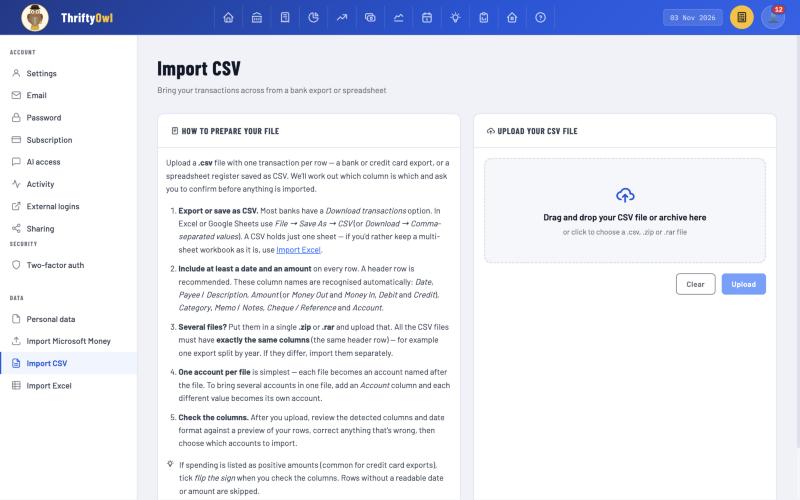
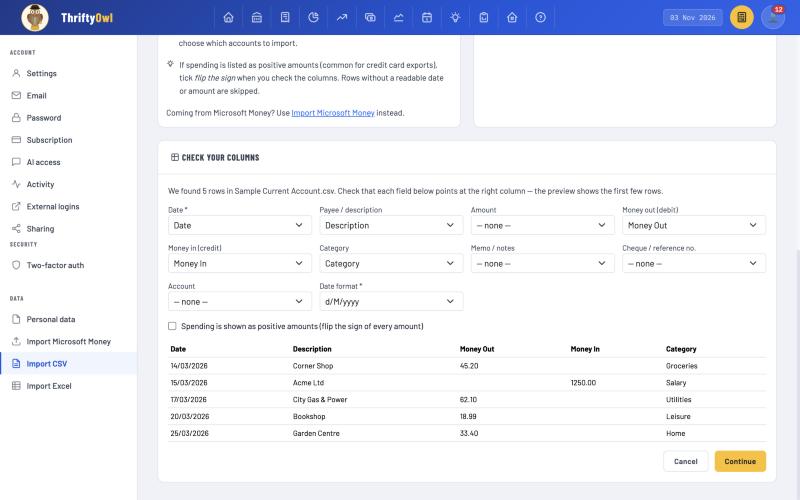
Bringing in a spreadsheet, or a bank that offers nothing else: use CSV. It is the format that nearly everything can produce, and a careful import that shows you the detected columns and a preview of the rows, before anything is saved, takes most of the risk out of the loose standard. ThriftyOwl.money's CSV import works this way. It recognises common column names such as Date, Description, Amount, Money In and Money Out, Debit and Credit, then asks you to confirm the columns and date format against a preview, and offers a "flip the sign" option for card statements that list spending as positive.
After the upload, the "Check your columns" step shows what was detected, with a preview of your rows, and lets you correct the date format or flip the sign before anything is saved:
If you have a choice between several, take the richest the destination accepts: QIF over CSV for history, because it keeps categories and splits, and OFX over CSV for downloads, because it prevents duplicates.
A short checklist for any file import
Whatever format you use, a few habits save a lot of trouble:
- Keep the original file untouched. Work from a copy.
- Check the date format against a transaction where the day is above 12, so you know which of day and month comes first.
- Check the signs. Make sure money going out is going out, in particular on credit card files.
- Compare a balance. After importing, check that an account's total matches the balance the bank or old program shows for the same date. If it matches, every transaction almost certainly arrived.
- Don't import the same file twice unless the format has transaction IDs, and even then check afterwards.
- Import a small account first. Run a quick test with a single account before you commit your whole history.
The bottom line
The three formats are less rivals than tools for different jobs. QIF is the best carrier of your own history, OFX is the best carrier of your bank's records, and CSV is the universal fallback that everyone can read and nobody can agree on. Knowing which is which turns a confusing download menu into a straightforward decision, and it stops the quiet errors, such as swapped dates, flipped signs and duplicated transactions, that make people distrust a migration that was actually fine.
If you're moving from Money or a spreadsheet, ThriftyOwl.money imports QIF, CSV and Excel files, and it shows you what it found before it saves anything.
About the author: Ian is the founder of ThriftyOwl.money. He built its Microsoft Money import tools himself and writes ThriftyOwl's white papers on the personal finance software industry.
Sources: Open Financial Exchange specification (ofx.net); FileFormat.com, "What is an OFX file?"; RFC 4180, "Common Format and MIME Type for Comma-Separated Values (CSV) Files" (IETF); Infinite Kind, "Importing From Microsoft Money".